![App Icon.png]](https://hola.homyhub.com/hs-fs/hubfs/App%20Icon.png?height=40&name=App%20Icon.png)
If you've already connected the door sensors to your HOMYHUB GARAGE, and despite physically opening and closing the door, the HOMYHUB App doesn't correctly mark or record the status changes (from open to closed and vice versa), you should review the physical installation of your sensors. This may indicate:
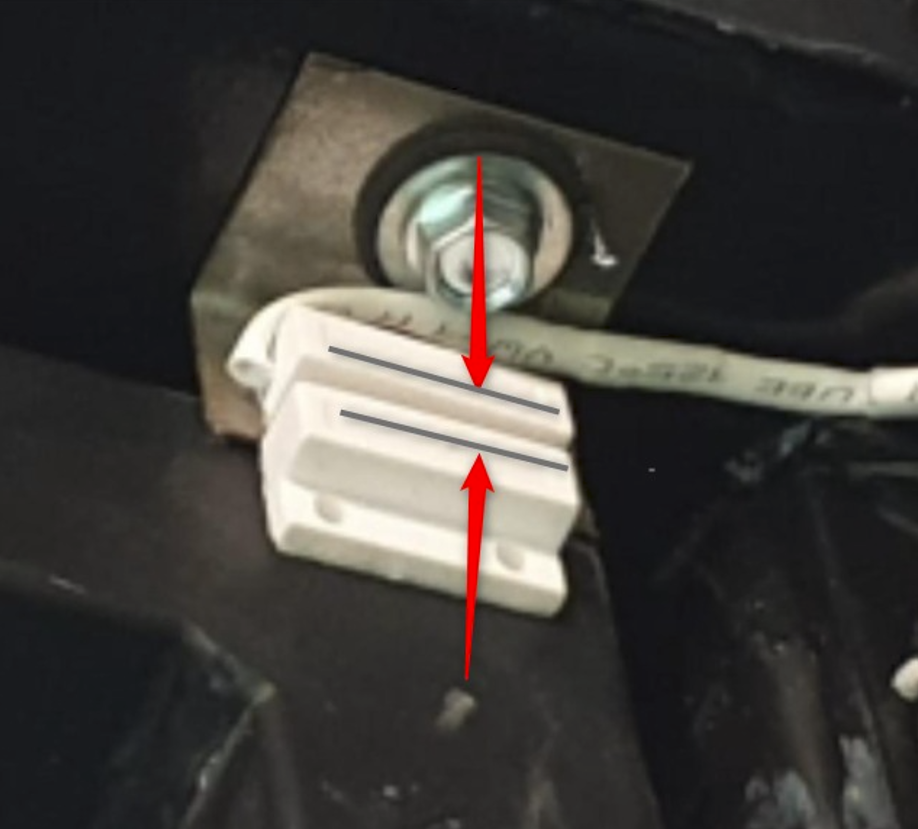
A-The sensors are not correctly positioned and therefore are not correctly aligned facing each other when the door is fully closed.
Reference example of how sensors should be aligned when the door is closed:
B-One of the two pieces has fallen off and needs to be repositioned, either the wired part or the loose magnet.
C-The cable has become disconnected, damaged, or broken.
For points A and B, remember that our app will guide you step by step with references to install the sensor correctly.
To do this, you just have to follow the next steps in the App:
1- In the menu on the App's main screen (three dot icon in the upper right corner), select “+ Install” which is where the installation wizard for HOMYHUB devices and their accessories is located.
2- On the next screen, choose "Sensors" and it will guide you step by step.
For point C, in case it is broken you can always buy a Extra replacement sensor on our website and be able to leave your garage like new!
Remember that properly functioning sensors will allow you to use HOMYHUB to:
- Know if your door is open or closed,
- Generate Open Door Alerts for when someone forgets to close it,
- Conveniently ask Siri, Google, or Alexa about the status of the door.
- Generate auto video recordings by integrating cameras with HOMYHUB, so they can be automatically recorded every time someone enters or leaves your garage,
And all this no matter where you are!, always keeping your garage safe 🔒.